CorosLink is the desktop way to add music to a COROS watch. Build a local MP3 library from YouTube, Spotify, YouTube Music, Apple Music and Apple Podcasts, then transfer tracks and episodes to the watch over USB. No phone required.
Music transfer requires a music-capable COROS watch and a USB cable. Streaming services keep their own account requirements.
COROS watches with music storage play MP3 files copied to the watch over USB. Doing that by hand means finding files, converting them and dragging them into the right folder. CorosLink handles the whole chain: it downloads or matches the audio, converts it to MP3, keeps a library with sync status, and copies pending tracks to the connected watch in one click.
Streaming services do not allow copying protected streams, so CorosLink never touches them. Spotify and Apple Music playlists are read for their track lists, and each track is matched to a public YouTube recording before download. You keep full control of what ends up on the watch.
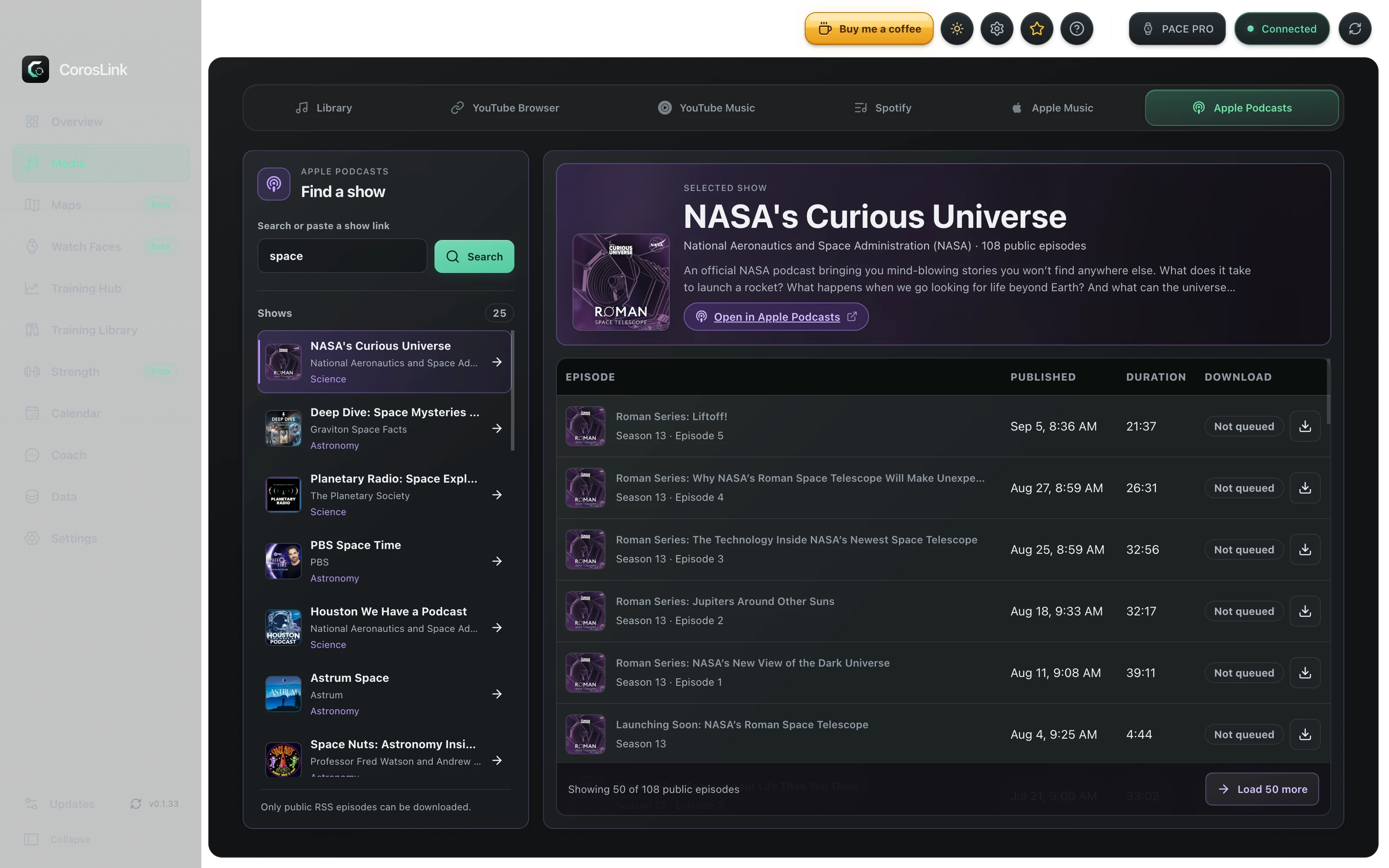
Media · Apple Podcasts · USB transfer queueLive app capture
Music sources
YouTube: browse inside the app and download any public video as an MP3
Spotify: sign in with your own Spotify developer app, sync playlists, auto-match tracks
YouTube Music: sync playlists and liked songs from your library
YouTube playlists: Google sign-in for the playlists on your channel
Apple Music: import playlist track lists and match them to public audio
Apple Podcasts: search shows and download public episodes
Local files: drop your own MP3s straight into the library
The library and USB transfer
Every download lands in one local library with title, size, date and watch status. Transfer a single track, or transfer everything that is pending, while the watch is connected. Optional auto-transfer copies newly downloaded music the next time the watch is plugged in.
Files are stored as plain MP3s on disk together with a small SQLite index, so you can back them up or move them like any other folder.
Which COROS watches play music
Music transfer needs a COROS model with onboard music storage and a USB connection. Music-capable models include the PACE 3, PACE Pro, APEX 2, APEX 2 Pro, VERTIX 2 and VERTIX 2S, plus newer watches with storage such as the PACE 4, NOMAD and APEX 4. Playback uses Bluetooth headphones paired directly to the watch.
Check the compatibility notes in the docs for your exact model and firmware before relying on a specific feature.
What CorosLink does not do
It does not download protected streams from Spotify or Apple Music, and it does not need or store your streaming password. Playlist access uses each service's own sign-in, and the tokens stay on your machine.
Podcast downloads are limited to public episode files that the show already publishes.
Step by step
How to transfer music to a COROS watch with CorosLink
1
Install CorosLink and open Media
Download the free desktop app for macOS, Windows or Linux, then open the Media section. The Library tab shows any MP3s already on your computer.
2
Add music
Search YouTube inside the app and download tracks as MP3, or connect Spotify, YouTube Music or Apple Music and pick playlists to sync. For podcasts, search Apple Podcasts and choose episodes.
3
Plug in your watch
Connect the COROS watch with its USB cable. CorosLink shows the watch storage and marks which library tracks are already on it.
4
Transfer
Click Transfer on a track or use Transfer all to copy every pending file. When the copy finishes, unplug the watch and pair Bluetooth headphones to play.
How do I add music to a COROS watch without a phone?
Use a computer. Install CorosLink, add tracks to the library from YouTube, Spotify, YouTube Music, Apple Music or your own MP3s, connect the watch by USB and click Transfer. The COROS mobile app is not involved.
Can I put Spotify playlists on a COROS watch?
CorosLink reads your Spotify playlists and matches each track to a public YouTube recording, which it downloads as MP3 and transfers over USB. Protected Spotify streams themselves are never copied, and Spotify Premium is not required.
Which file format does a COROS watch need?
MP3. CorosLink converts downloads to MP3 automatically, so anything in the library is ready to copy.
Does music transfer work on a Mac?
Yes. CorosLink runs natively on macOS (Apple Silicon and Intel), Windows and Linux, and USB transfer works the same on all three.
Why does a Spotify or Apple Music track sound different from the original?
Because it is a matched public recording, not the streaming file. CorosLink searches for the official audio upload; you can replace a match with a different download at any time.
Can I download podcasts to a COROS watch?
Yes. Search Apple Podcasts in the app, download public episodes into the library, and transfer them exactly like music.