Free download · macOS, Windows, Linux

The COROS desktop app for Mac, Windows and Linux.

CorosLink puts your COROS watch on a big screen. Transfer music over USB, install offline maps, plan GPX routes, and read your training analytics without a phone in the loop. Free and open source.

Latest builds are published on GitHub Releases: github.com/JunAkerBuilds/CorosLink/releases

COROS ships a phone app, not a desktop app. CorosLink fills that gap: it is a native desktop companion that talks to your watch over USB and to your COROS account for training data. Everything stays on your computer; there is no CorosLink account or cloud.

The installers below are the latest signed builds from GitHub Releases. macOS builds are notarized; Windows uses a standard installer and Linux ships as an AppImage.

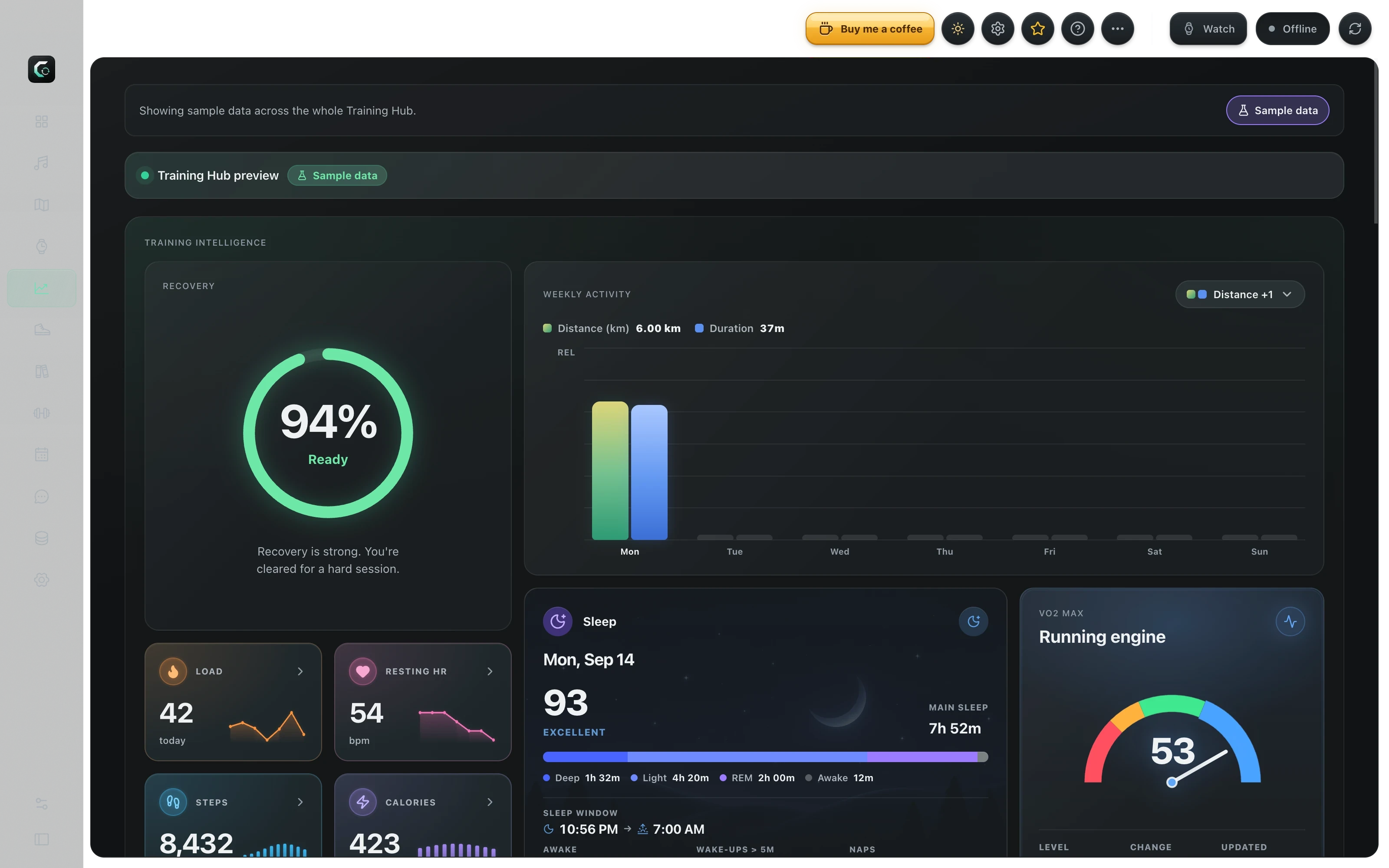
CorosLink desktop app on macOS showing the Training Hub with recovery, training load and weekly activity
CorosLink 0.1.x · Training Hub · Sample dataLive app capture

Ready when you are

More watch.
Zero price tag.

Pick your computer. Plug in your COROS.
Make it yours.

Free & open source No CorosLink account

Support the project

CorosLink is free — coffee keeps it brewing.

Late-night USB debugging, map tiles, and playlist fixes all run on caffeine. If CorosLink saves you a sync headache, buy me a coffee.

Buy me a coffee

What the desktop app does

  • Transfer MP3s and public podcast episodes to a music-capable COROS watch over USB
  • Import playlists from Spotify, YouTube, YouTube Music and Apple Music
  • Download official COROS Landscape and Topo offline map packages and install them
  • Build loop or point-to-point GPX routes with elevation stats
  • Review training load, recovery, EvoLab fitness and race predictions
  • Back up every activity as FIT, GPX, TCX, KML or CSV
  • Sync planned workouts to Google or Apple Calendar
  • Design custom watch faces in the Studio or browse the community library

System requirements

CorosLink runs on macOS (Apple Silicon and Intel), 64-bit Windows, and 64-bit Linux. You need a USB cable for music, maps and watch-face transfers, and a COROS account if you want training analytics.

Which features you can use depends on your watch. Music needs a music-capable model, offline maps need a map-capable model. The compatibility page in the docs lists what each watch supports.

Updates and safety

The app checks GitHub Releases for new versions when it starts and installs updates in the background. Release DMGs are signed and notarized for macOS.

CorosLink is open source. You can read every line on GitHub, build it yourself, or report an issue if something looks wrong.

Not the official COROS app

CorosLink is an independent, community-built app. It is not owned by, affiliated with, endorsed by, or supported by COROS.

You still use the official COROS mobile app for pairing, firmware updates and route import. CorosLink complements it from the desktop.

Step by step

How to install CorosLink

  1. 1

    Download the installer for your computer

    Pick macOS (Intel or M-series), Windows or Linux below. Each button links to the latest release asset; if GitHub is unavailable it opens the releases page instead.

  2. 2

    Install it

    macOS: open the DMG and drag CorosLink into Applications. Windows: run the installer and accept the SmartScreen prompt for unsigned builds. Linux: mark the AppImage executable, then run it.

  3. 3

    Plug in your COROS watch

    Connect the watch with its USB cable. CorosLink detects it and shows storage, so you can start transferring music or maps right away.

  4. 4

    Sign in only where you need to

    Training and calendar features use your COROS login. Music services connect individually. Nothing is required to start using the app.

Good to know

Questions

Find more in the docs
Is there an official COROS app for Mac or PC?

COROS does not publish a desktop app; the official COROS app is for iOS and Android. CorosLink is an independent, open-source desktop companion that works alongside the official mobile app.

Does CorosLink cost anything?

No. CorosLink is free and open source with no subscription and no CorosLink account. Optional services you connect, such as Spotify or OpenRouteService, may have their own accounts.

Which COROS watches work with the desktop app?

Training analytics work with any COROS account. USB features depend on the watch: music transfer needs a music-capable model such as the PACE 3, PACE Pro, APEX 2 Pro or VERTIX 2, and offline maps need a map-capable model. Check compatibility in the docs before downloading map packages.

Is it safe to install?

Builds are published from the public GitHub repository. macOS releases are signed and notarized. If an older or self-built copy is blocked by Gatekeeper, the install guide explains how to clear the quarantine flag.

Where is my data stored?

Locally, on your computer. Your music library, cached maps and settings live in the app's data folder. Training data is fetched from COROS on demand and is not sent to any CorosLink server.